

In today’s article, we will introduce you to Node-RED. Node-RED is a powerful programming tool that is quickly becoming the go-to method of building Industrial Internet of Things, or IIoT, applications for PLCs.
Using Node-RED, engineers are able to extract data from PLCs and other industrial hardware and push that data to the cloud for analysis and integration with higher-level software like machine learning algorithms.
What is IoT?
Unless you’ve been living under a rock, you’ve probably heard about the Internet of Things or IoT already. The IoT is not new. The IoT has been around for many years, but the term was not made popular until the early 2000s.
The first emerging IoT devices were consumer devices such as home thermostats and security systems.
IoT Vs. IIoT
So, what’s the difference between the IoT and the IIoT? Well, not that much, as the terms are often used interchangeably. The big difference is their applications. IoT devices are consumer-focused, while IIoT devices are industry-focused.
The IoT refers to a network of physical devices or things embedded with sensors, software, and other technologies to connect and exchange data with other devices and systems over the internet.
The IIoT is technically part of the IoT but specifically targets industrial applications. It connects machines, sensors, and systems using more robust and secure technologies to improve operational efficiency, safety, and reliability.
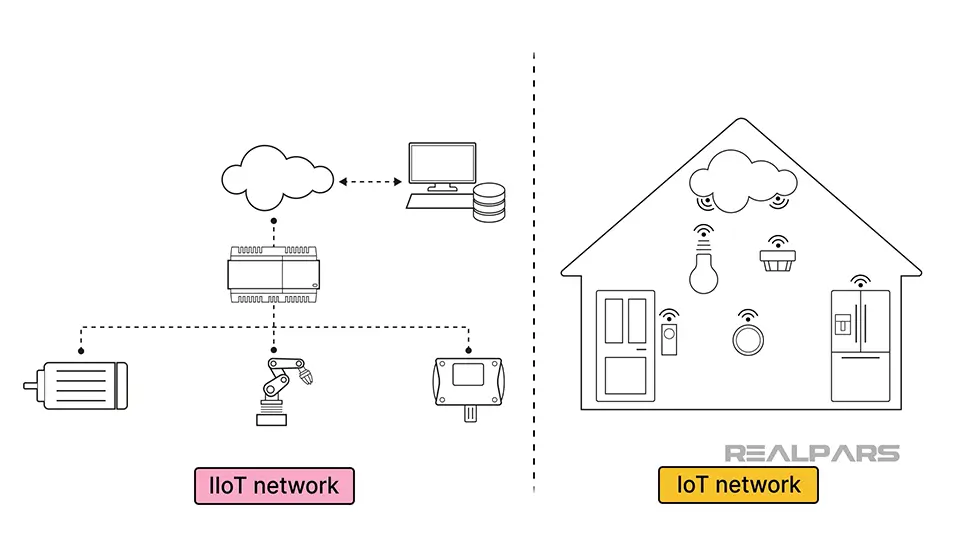
Ok…so how do we connect to the internet using our IIoT devices, and how do we collect and act on the data we get from these devices?
What is Node-RED?
Node-RED is a low-code programming tool for connecting hardware devices, APIs, and online services.
What’s great about Node-RED is that it’s open-source and free for anybody to use.
It can be run on many cloud services, such as AWS, Microsoft Azure, and IBM Cloud.
With its visual interface, you can quickly build robust applications to automate and monitor your processes.
It was developed in 2013 in IBM’s Emerging Technology Services Group as a proof-of-concept for visualizing and manipulating mappings between MQTT topics.
The developers quickly realized that Node-RED was a useful tool that could be extended in many directions and, in September 2013, the project was open-sourced.
To this day, Node-RED remains an open-source project and is built in the open.
Under the hood, Node-RED is built using Node.js, a very popular JavaScript programming framework. Since it is built with a JavaScript framework, all of the programming in Node-RED is done using JavaScript.

In case you are not familiar with it, JavaScript is a programming language that is commonly used in web development. JavaScript is the programming language that is used to add interactivity to web pages.
JavaScript is a very popular programming language among IT professionals and GitHub, a software developer platform, has consistently ranked it as the number 1 programming language in the world.
One of the reasons why JavaScript is such a popular programming language is that it is quite easy for new developers to learn.
Node-RED Nodes
One of the reasons that Node-RED is popular for IIoT applications is that Node-RED is highly extendible.
The Node-RED community develops and shares nodes that can be used in flows to easily add complex functionality.
There are currently 250,000+ nodes that are available to use in your Node-RED projects to communicate using specific protocols, connect your Node-RED flows to cloud providers, and more. Whatever you need to do in a Node-RED project, there is probably a node available for it.
If you are curious, you can browse all of the available nodes by navigating to nodered.org and clicking on the Flows link. On the flows page, you can click See more to view all nodes and sort them by popularity or number of downloads.

Now that we have an introduction to Node-RED, let’s see how we can develop flows in Node-RED.
Programming in Node-RED
Node-RED is a flow-based programming tool. In flow-based programming, an application is built up of a network of nodes. Each node in the flow has a well-defined purpose - it takes data in, processes the data, and outputs the processed data.

The flow of data between nodes is defined by networks that connect nodes together.
Flow-based programming is easy to understand since the process is structured visually. A viewer can generally figure out what a flow is doing without looking at any of the underlying code.
Since flow-based programming doesn’t require much programming knowledge, it is accessible to a wider audience. If you can break a problem down into discrete steps, then you can probably assemble a flow to tackle that project in Node-RED regardless of your programming ability.
You build Node-RED flows in a web-based development environment. Since the development environment is web-based, you don’t need to install any software, other than a web browser, on your machine to get started.
Building flows in Node-RED is designed to be easy and the development environment has a drag-and-drop interface with a very low learning curve.
When you are programming with Node-RED, it is important to be aware that Node-RED is an event-driven framework. This is very different from PLC programming which has cyclic scan cycles.

Once you get used to it, programming event-driven applications becomes very intuitive and is generally what’s required for IIoT applications.
If you want to learn how to build Node-RED applications, then we recommend that you check out our course Node-RED with WAGO PLCs.
This course was developed in partnership with WAGO. At the end of the course, you will get a certification from WAGO.
In that course, you will learn how to install Node-RED on a WAGO CC100 PLC, how to use a Node-RED flow to read and write a PLC’s IO points, how to exchange data between a Node-RED flow and a CODESYS application, and how to build a web-based visualization for a PLC using Node-RED.
Other nodes that interface with a PLC program can be added and consequently collect data from field devices.
For example, nodes can be added to interface with PLCnext Technology.
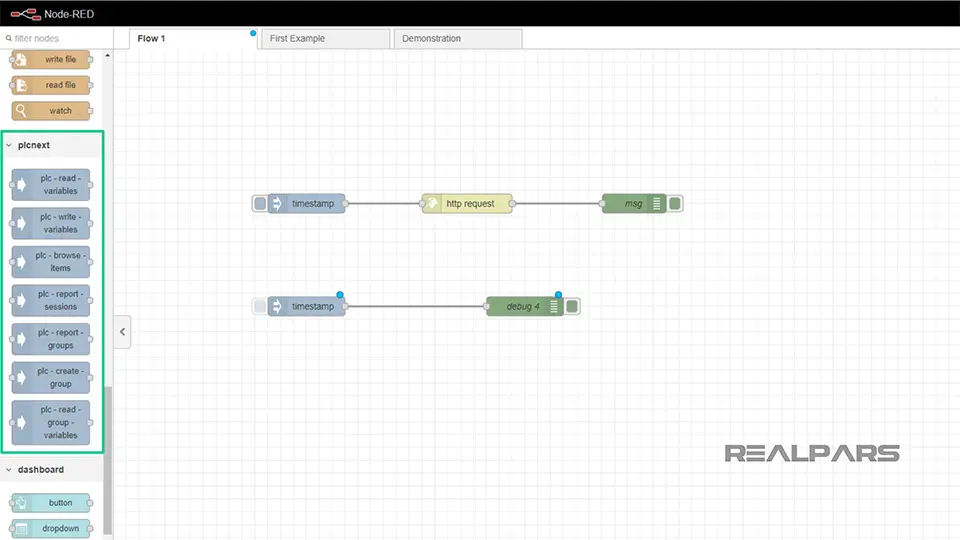
Alright…so we’re using Node-RED to collect data from field devices connected to a PLC. This data can be anything from the temperature of a commercial cookie oven to the flow rate through a pipe. How can we move this data via the Internet or a cloud-based database?
MQTT
A very popular messaging protocol is Message Queuing Telemetry Transport, or MQTT. Its inherent characteristics make it ideal for IoT devices.
MQTT has two primary entities: the broker and the clients. The broker acts as a central hub directing communication between clients. Clients can be devices or applications that send or receive messages. MQTT operates on a publish/subscribe model.
An MQTT message consists of a topic and a payload. The payload carries the actual data, while the topic categorizes the message and determines which clients will receive it.
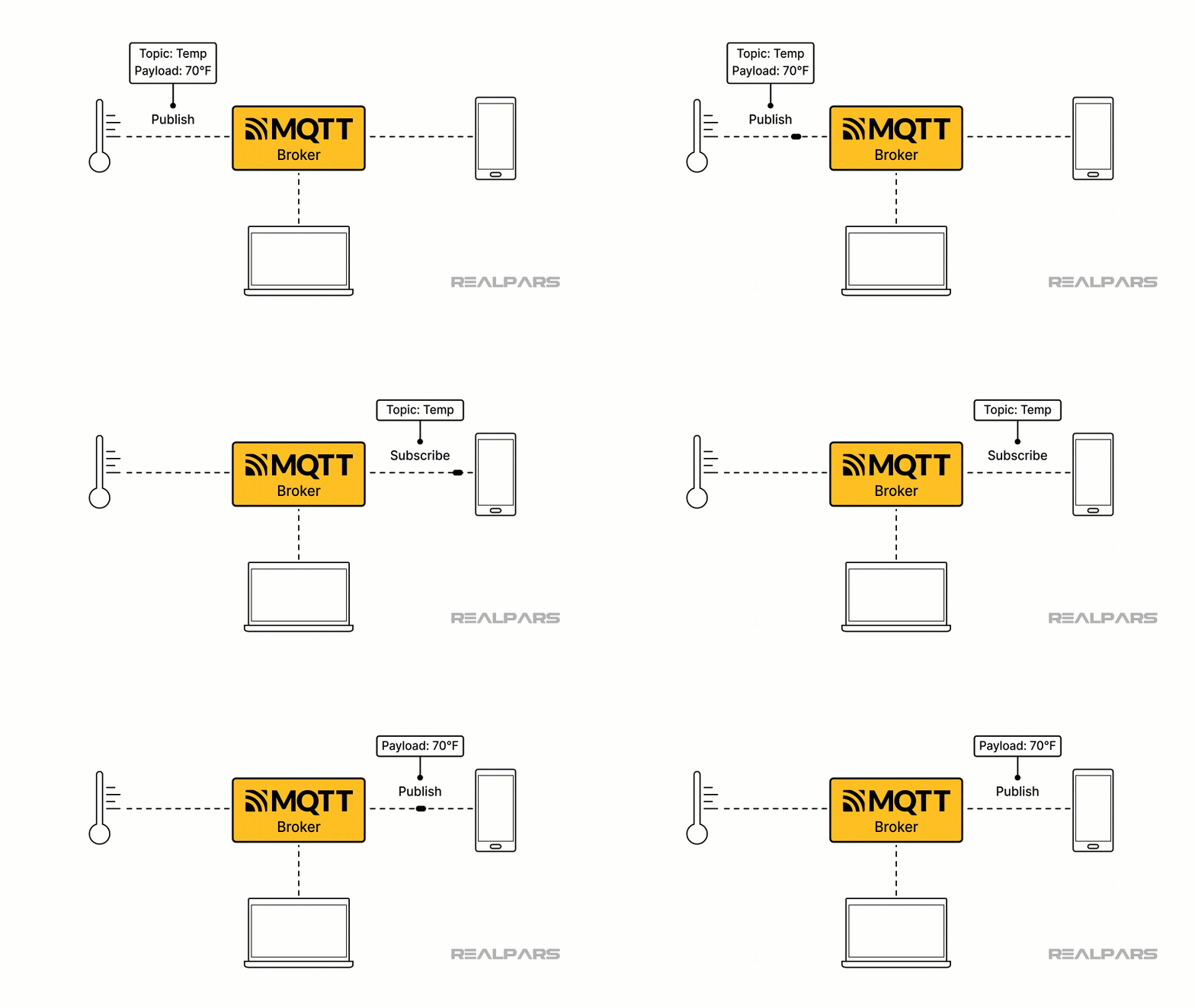
MQTT requires the use of a central Broker.
MQTT Brokers are available on the internet, including Mosquitto, HiveMQ, CloudMQTT, and many more.
Node-RED and MQTT integration
So, if we combine Node-RED with MQTT, we get a dynamic team for IIoT solutions. We can set up a system in which sensors, controllers, and monitoring tools all communicate seamlessly.
Let’s look at an example of using Node-RED and MQTT together. We will use Node-RED to collect the data and MQTT to move it. In our example, we’re using PLCnext Technology.
We use the plc-read-variables node to read three variables: Slider, TEMP, and ALARM.
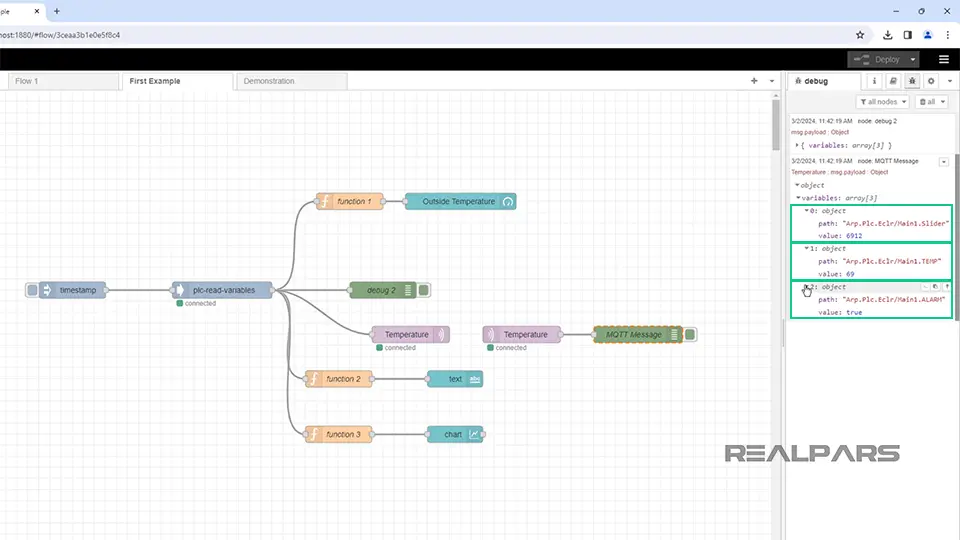
We’re using an MQTT out node to collect the variable data from the plc-read-variables node and an MQTT in node to receive the data from the broker.
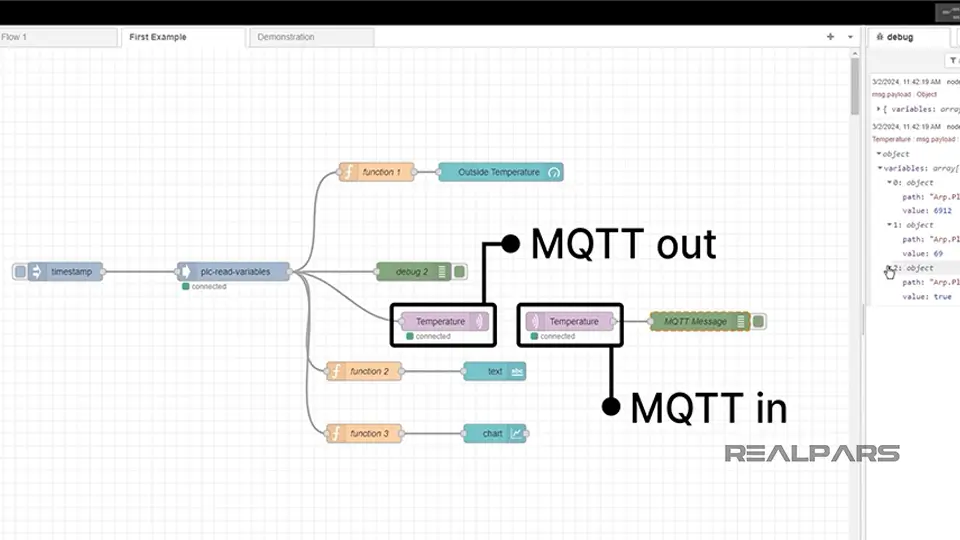
As we discussed, MQTT uses the Publish/Subscribe model to send and receive messages between clients. We are using Node-RED MQTT nodes to publish and subscribe to messages.
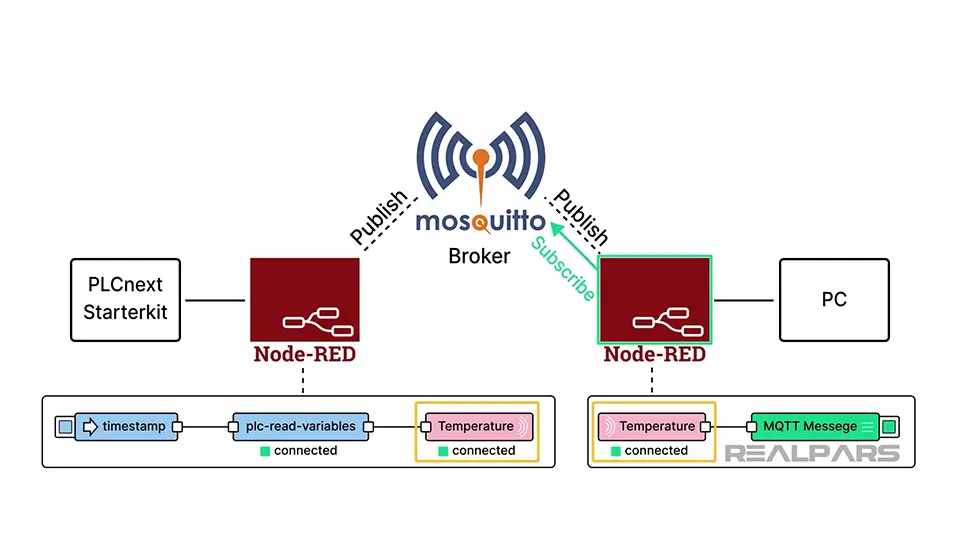
MQTT publishes and subscribes to Topics. We have created a Publish Topic called Temperature. The message in our publish topic contains the three variables originating from the Node-RED plc-read-variables node.
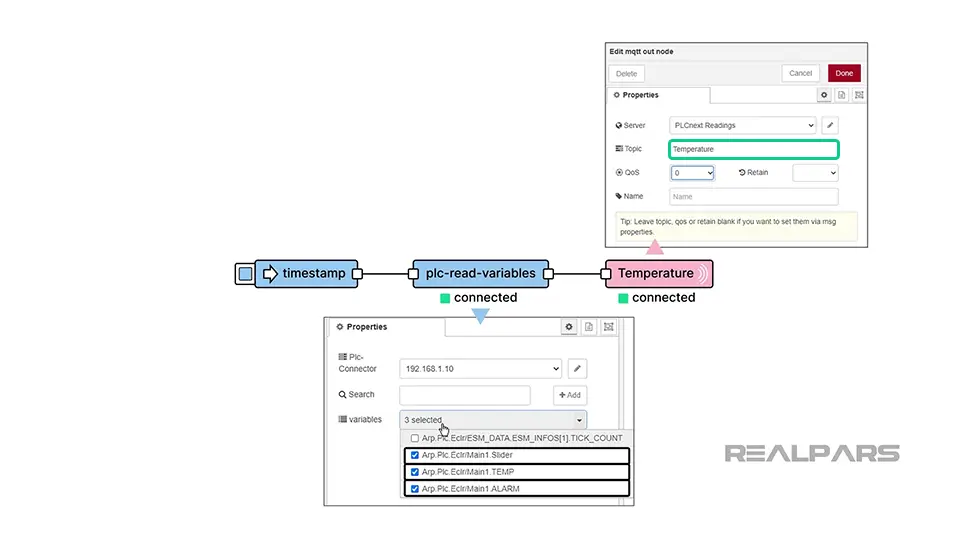
We have a PC subscriber also subscribed to the topic Temperature. Whenever the Temperature topic values are published, the Subscriber PC will receive the message containing the three variables.
We use Mosquitto MQTT as the Broker.
The broker receives and filters all messages, subsequently publishing them to the PC, which is the subscriber.
We use the MQTT Broker via our PLCnext Controller.
MQTT messages are an event-driven paradigm, where they are sent and received in response to specific events.
In our example, the subscriber does not detect temperature alterations until we trigger the inject node.
If you want to learn more about using Node-RED and MQTT with PLCnext Technology, check out our course IIoT Essentials: Node-RED & MQTT on PLCnext Technology.
Developed in partnership with Phoenix Contact, this course will show you how to install, configure, and integrate these technologies through hands-on projects. Upon completion of the course, you’ll receive a certificate from Phoenix Contact.
Conclusion
In this article, we explained what Node-RED is and how you can use Node-RED and MQTT to build IIoT applications for PLCs.
Learning to use IIoT technologies like Node-RED and MQTT can set you apart in industrial automation.

