

Counters are very important instructions in PLC programming that are used to count how many times an event has occurred.
In this article, I will introduce you to counters in Studio 5000 Logix Designer. By the end of the article, you will understand how counters work in general and know the specific counter instructions that are available for the Ladder Diagram programming language in Studio 5000 Logix Designer.
Counter concepts
Counter instructions are used to count the number of times an event has occurred and to indicate when a threshold has been reached. Before we look at the specific counter instructions that are available for the Ladder Diagram programming language in Studio 5000 Logix Designer, let’s quickly look at how counters work in general.
A counter instruction increases its accumulated value when the rung-in condition of the instruction becomes True.
When the accumulated value is equal to or greater than the preset value, which is defined by the PLC programmer, then the counter is done and an output is turned on.
A separate reset instruction can be used to reset the accumulated value of the counter to 0.
You can use a counter to, for example, count the number of times that a motor has started to determine when predictive maintenance is required. We work through an application like this in Learn Logix 7.
Now that you know how a counter works in general, let’s look at the specific counter instructions that are available for the Ladder Diagram programming language in Studio 50000 Logix Designer
Counters in Studio 5000 Logix Designer
Count Up (CTU)
The Count Up instruction, or CTU, is used to count the number of times that an event has occurred using an incrementing counter that starts at 0.

The accumulated value, or ACC, increases every time the rung-in condition for the instruction becomes True.
When the accumulated value is equal to or greater than the preset value, or PRE, the done, or DN, bit becomes True indicating that the counter is done.

This done bit remains on until the counter is reset with a Reset, or RES, instruction or the accumulated value is less than the preset value.
Count Down (CTD)
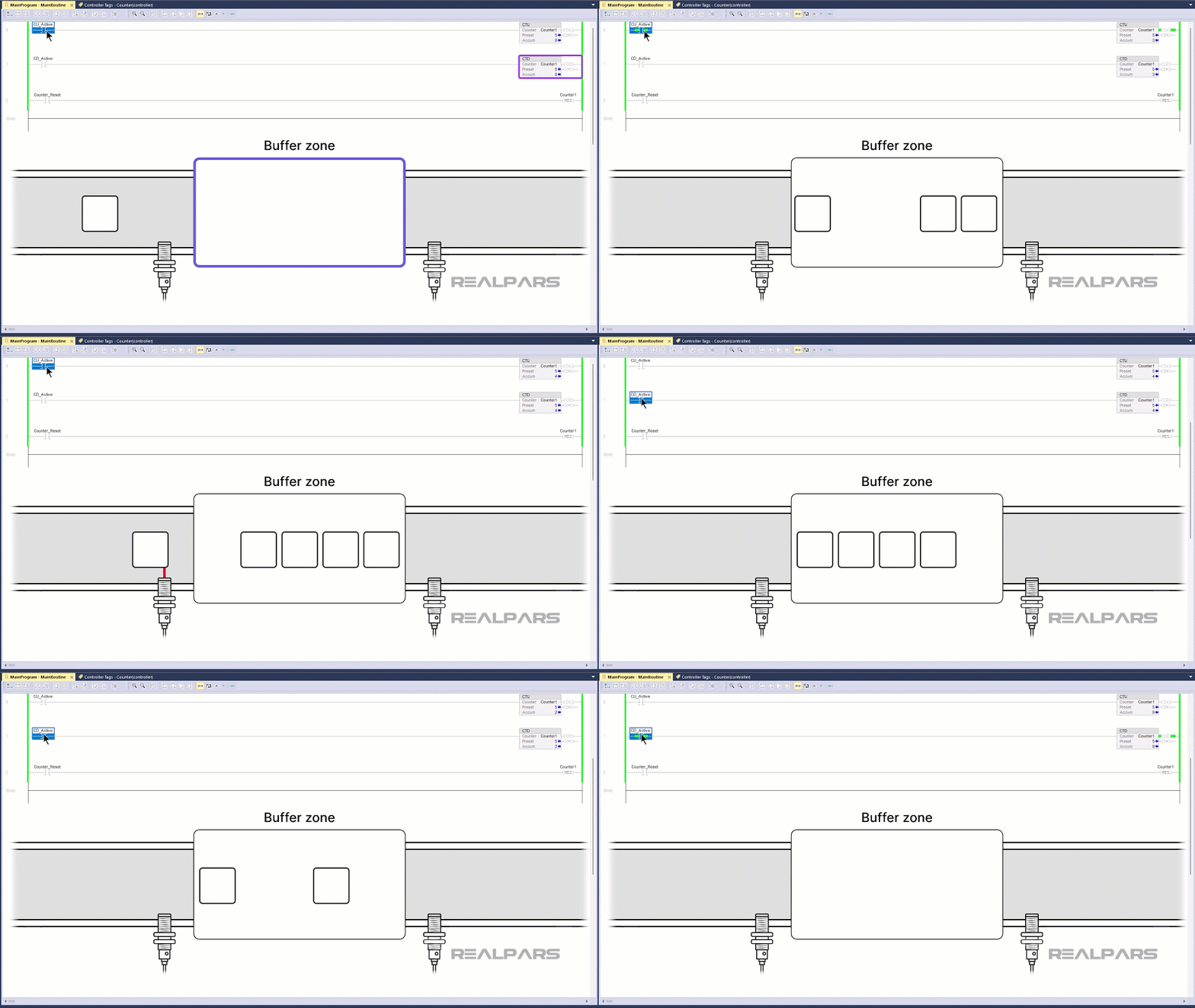
The Count Down, or CTD, instruction is used to decrement a counter value. A Count Down instruction is typically used with a Count Up instruction, with both instructions referencing the same tag.
When the rung-in condition for a Count Down instruction becomes True, the accumulated value, or ACC, is decreased by 1.
The instruction’s Done, or DN bit, is True while the accumulated value is equal to or greater than the preset value.
You might use a Count Down instruction to track how many pallets are in a buffer zone.
A Count Up instruction could be used to count how many pallets enter the zone and disable more pallets from entering the zone when it is full.
A Count Down instruction could be used to count how many pallets have left the zone and enable more pallets to enter the zone when there is space available.
Overflow bits
Since the accumulated value of a counter can continue to increase or decrease when the counter is done, there is a risk that the accumulated value will overflow or underflow.
A tag overflows when it increments past its upper limit. When a counter overflows, it flips from being a positive number to a negative number.
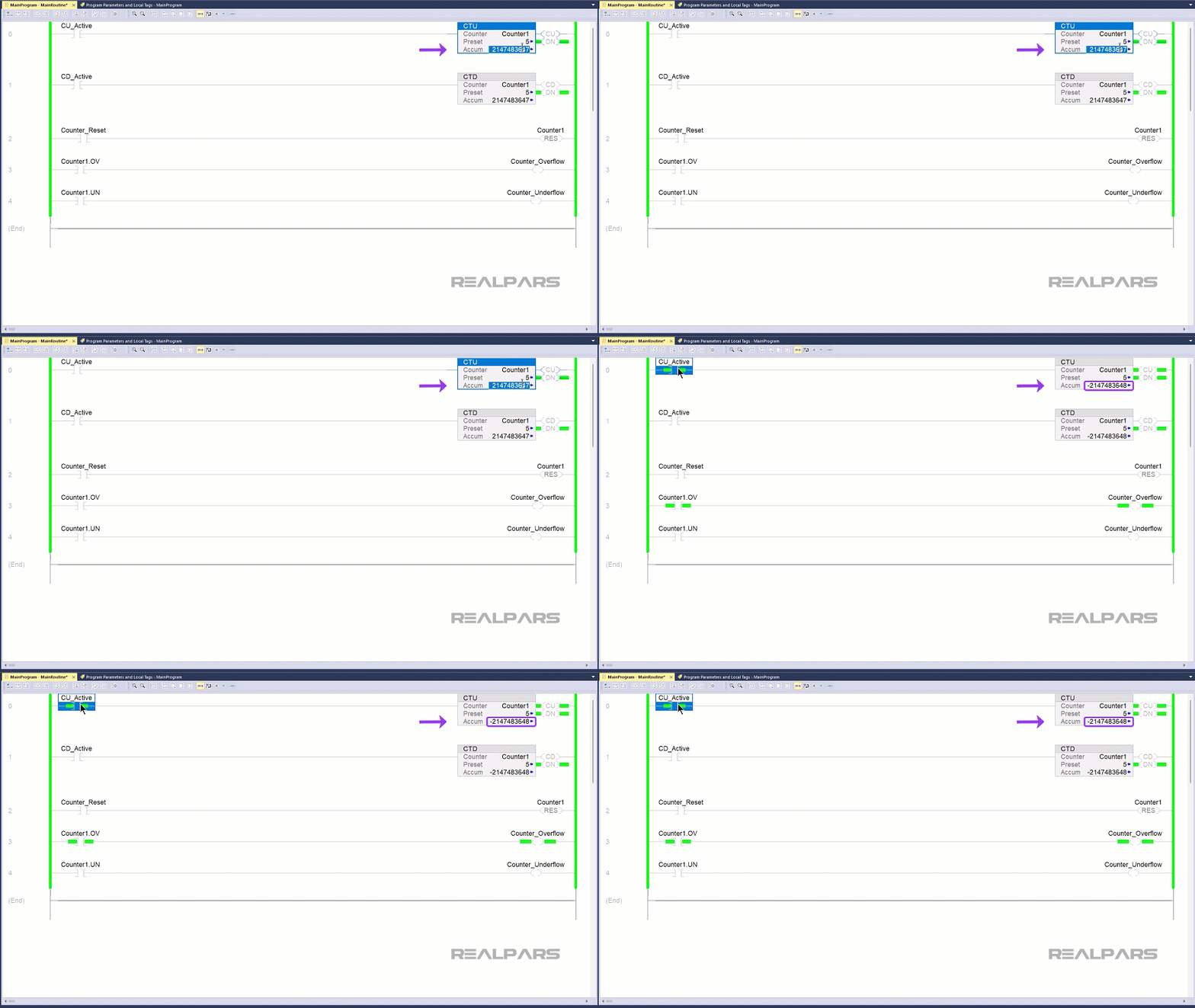
Since the counter goes from being positive to negative, the accumulated value suddenly goes from being greater than the preset value to being less than the preset value, and the Done bit is no longer updated.
In contrast, a tag underflows when it decrements past its lower limit. When a counter underflows, it flips from being a negative number to a positive number.

Since there is a risk that the accumulated value will overflow or underflow, a counter tag includes an overflow member called OV and an underflow member called UN. You can check these bits to determine if an overflow or underflow has occurred.
Wrap-Up
In this article, you learned how counters work in PLC programming in general.
You also learned specifically what Counter instructions are available for the Ladder Diagram programming language in Studio 5000 Logix Designer.
Although they are outside of the scope of this article, you should be aware that there are other types of counters available for other programming languages, like Function Block Diagram and Structured Text that behave slightly differently.

